How to Use Magnet Links: A Simple Guide for Beginners

Using magnet links is surprisingly straightforward even if it sounds a bit geeky at first. Here’s the quick answer: install a BitTorrent or torrent client, click or paste the magnet link into the client, and it will automatically start fetching the file via peer-to-peer. In short, you don’t need to download any separate torrent file—just let the magnet link do the work.
What Are Magnet Links—and Why They Matter
Magnet links are a clever shortcut to sharing files via torrent networks. Instead of a .torrent file, a magnet link contains a cryptographic hash that points directly to the content. You don’t have to host the actual file anywhere—just the hash to find it.
They’re great for privacy, saving space, and simplifying sharing. Imagine sending a long string instead of a file—easier, cleaner, less chance of corruption.
Choosing a Torrent Client
Popular Options (and why they work)
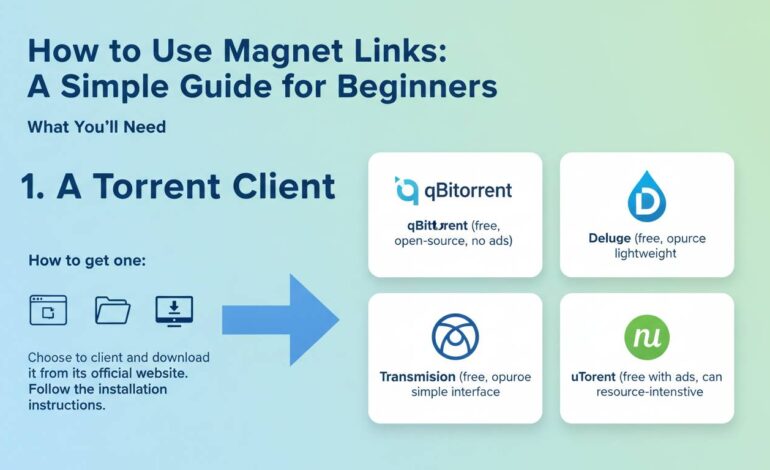
You’ll need software to interpret that magnet link. Some solid picks:
- qBittorrent – lightweight, ad-free, good balance of features
- Transmission – minimalist and clean, often built into Linux distros
- µTorrent – well known, but watch for ads or bundled software
- Deluge – flexible with plugins if you like tweaking things
Install one that suits your comfort level. On Windows and macOS it’s just a standard installer. On Linux it often comes from your distro’s package manager.
Step-by-Step: Using a Magnet Link
1. Find or receive your magnet link
You’ll usually get something starting with magnet:?xt=urn:.... It might be embedded in a webpage or shown as clickable text.
2. Click it or copy-paste it
- Clicking typically opens in your default torrent client—just confirm the action.
- Want more control? Copy it and paste into the client manually (often via a “Add torrent from URL” option).
3. Choose download settings
Pick where to save the file. You can often adjust settings like download speed limits or number of connections—handy if you don’t want the download clogging your whole connection.
4. Let it rip
Client connects to peers, fetches pieces of the file, reassembles it. Progress bar, speeds, peers info—most clients display all that. Once complete, you can open or move the file.
Tips to Make It Smooth and Safe
Check your security
Torrenting still has risks. Use antivirus software. Avoid magnet links from sketchy sites. And if privacy is a big worry, consider using a VPN—but be aware, VPN plus torrenting can have its own legal or performance considerations.
Prioritize healthy torrents
Some magnet links have fewer peers, meaning slower or stalled downloads. Use torrent sites that show peer counts or “health” bars. A healthy swarm = faster download.
Manage bandwidth
If your internet slows down while torrenting, many clients let you cap download/upload speeds. Some even let you schedule downloads for off-peak hours.
Behind the Technology: Why Magnet Links Work
Magnet links rely on a distributed hash lookup system. The “info hash” present in the link identifies the content uniquely. BitTorrent clients query trackers or DHT (Distributed Hash Table) networks using that hash. They find peers sharing the content and connect directly to them.
This makes magnet links self-contained. You don’t need a central server hosting the .torrent file—they’re more robust that way.
A Mini Case Study: “The Curious Downloader”
Julia wanted to download a public domain audiobook from a library torrent site. The site offered a magnet link rather than a .torrent file. She had never torrenting before, but here’s what she did:
- Installed qBittorrent on her laptop.
- Clicked the magnet link and confirmed the “open in qBittorrent” prompt.
- Selected a download folder and hit OK.
- Watched the download go from 0% to 100% in just a few minutes.
- Played the audiobook in her media player—clear, and no extra steps involved.
This real-world example shows how magnet links simplify the process. No files to manage—just download and enjoy.
Pros & Cons of Magnet Links
Pros:
– No .torrent file clutter
– Easier to share and copy across platforms
– Generally more resilient—no single point of failure
Cons:
– Initial connection can be slower until peers are found
– Some clients may not support DHT or peer discovery by default
– Risk of misleading links or malicious content if from untrusted sources
Expert Insight
“Magnet links represent a shift toward decentralized file sharing. They simplify distribution without relying on central servers, which is both efficient and durable.”
This captures why magnet links have grown popular, especially among communities sharing large files or open archives.
Advanced Topics (Optional)
Customizing your client setup
Some folks like to set default download locations, auto-categorize media, or add RSS feeds for auto-downloading. If you’re comfortable, dig into settings. But for most casual users, defaults are fine.
Magnet links in script or automation
If you’re technical, you can automate magnet downloads using CLI clients like aria2c or rtorrent. Great if you want to queue multiple links or integrate into workflows.
Common Pitfalls—and How to Avoid Them
-
Nothing happens when you click the magnet link?
Make sure your browser knows which app to use. Some need manual association. -
Download stalls at 0%
Might mean no peers found. Try enabling DHT or looking for a more popular link. -
Unexpected files or malware
Be sure of what you’re downloading. Check file names, sizes, or site reputation before you click.
Final Thoughts
Magnet links are a simple and elegant way to download files via torrent. With just a click or paste into a BitTorrent client, you avoid managing .torrent files and lean on distributed networks for durability.
If you’re just starting out, stick to trusted clients and sources, watch your bandwidth if needed, and you’ll get the hang of it in no time. Once you’re comfortable, you can tweak settings or even automate.
FAQs
What do I need to use a magnet link?
You just need a BitTorrent client like qBittorrent, Transmission, or µTorrent. Once installed, clicking or pasting a magnet link in the client starts the download.
Why don’t I need a .torrent file?
The magnet link contains a hash that tells the client what content to look for. The client finds peers sharing the content via DHT or trackers, so no .torrent file is needed.
What if the download doesn’t start?
Check for peer availability—if there are no seeders or DHT is off, you might not connect. You can enable DHT in your client settings or choose a healthier torrent.
Are magnet links safe?
They’re no more dangerous than any downloaded file—you should use trusted sources and antivirus, and consider a VPN if privacy matters to you.
Can I use magnet links on my phone?
Yes! Some mobile apps like Flud for Android or iTransmission for jailbroken iOS handle magnet links too. Just click the link or paste it into the app.
Will magnet links work forever?
As long as there are peers sharing the file and your client can discover them, yes. But if no one is seeding, the link won’t fetch anything.