Greater Than Symbol > Usage, Meaning, and Examples

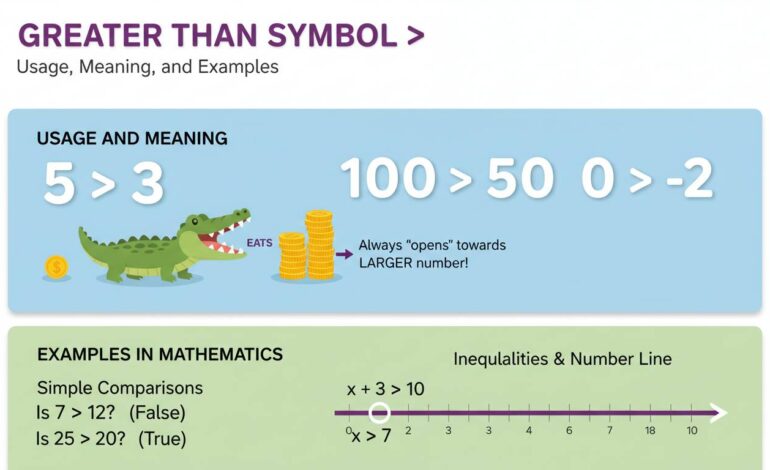
The greater than symbol (>) is a simple mark used to compare two values—one is larger or higher than the other. It’s easy to use: place the symbol between two numbers or expressions, with the bigger one on the left of the symbol. This is how you indicate that “A is greater than B.” Ready to see how it works across contexts? Let’s dive in.
Why the Greater Than Symbol Matters in Everyday Use
The greater than symbol isn’t just for math class. It shows up in coding, sorting, comparing prices, sorting email, or even chat. People lean on it for quick comparisons—like “\$50 > \$30” to mean something costs more. The symbol’s clarity makes it universal, especially when space is tight or precision matters.
On a broader note, this little symbol stands for clarity and order—essential in logic, data, and even casual conversation. Without it, expressing “bigger than” quickly would be clunky.
Basic Rules of Using “>” in Math
Placement and Spacing
Got two numbers? Write the bigger one on the left, the smaller one on the right, separated by “>”. For example:
7 > 3
Spacing isn’t strictly enforced, but it helps readability:
7>3 works, but 7 > 3 looks cleaner.
What It Means
When we say “7 > 3”, it’s stating a fact: seven is more than three. This also applies to expressions:
x + 2 > 5 means whatever x + 2 equals, it’s more than five.
You’ll see this a lot in solving inequalities, graphing situations, or clarifying bounds on numbers.
Greater Than in Programming & Logic
Across different programming languages, “>” is a universal operator. It compares values and returns true or false.
In Code (like JavaScript, Python, C++)
5 > 2: Returnstruea > b: Evaluates based on whataandbhold
Here’s a quick breakdown:
Language | Syntax Example
— | —
JavaScript / Python | if (a > b) { … }
C / C++ / Java | if (a > b) { … }
SQL | SELECT * FROM table WHERE age > 30;
This speeds up logic checks. And yes, it works the same for dates or strings in many systems (though some need special setup).
Real-World Examples That Connect
Think of your bank alert: “Balance > 0.” That’s a check if your account has cash. Or shopping filters: “Price > \$100” shows you the pricier picks. In spreadsheets, sorting high to low? The system uses “>” behind the scenes.
Even in everyday talk, we write “10 > 5” when explaining why one choice is better, like comparing product features or scores.
Grammar, Misuse, and Visual Lookalikes
Often Confused Symbols
Don’t mix it up with these:
- Less than (<) — reversed direction
- Arrow (→) — points direction, not size
- Greater-than or equal (≥) — means “greater than or exactly equal”
- HTML tag syntax — e.g.,
<div>— not a comparison
Common Errors
Putting numbers in reverse: 3 > 7 is wrong if you meant the opposite.
Or writing both sides equal, like 5 > 5—that’s false. In programming, this can lead to logic bugs.
Tip: If something looks off, reverse the order or use “>=” if equality is allowed.
When You’re Coding: Pitfalls and Best Practices
Careful with types. In some languages, comparing strings directly with > can yield unpredictable results. Like "10" > "2" might return false, because it compares characters—’1′ versus ‘2’.
Also, beware of null or undefined values in languages like JavaScript. They can lead to false or runtime errors when used with >.
Best practices:
– Validate types or cast them before comparing
– Use explicit parentheses in complex expressions
– Keep your logic tight and readable
Practical Tips for Clear Usage
- Always put the expected larger value on the left.
- Use spaces around “>” for readability.
- Confirm your comparison logic makes sense—especially in conditionals.
- For beginners, double-check with simple examples before running full code.
Human Tip: Why This Symbol Feels Intuitive
Ever notice how “>” kind of points to the smaller thing? It’s visual shorthand your brain takes easily—more to the left, less to the right. It’s fast, visual, almost instinctive. That’s why we’re happy using it without thinking.
“The greater than symbol works because it visually orders numbers. It’s quick to read and instantly signals magnitude.” — a math teacher’s insight
Conclusion
The “greater than” symbol (>) may seem basic, but it’s powerful in daily life, coding, logic, and beyond. Its clean form and universal meaning make it essential for comparisons, filters, and algorithms. Just remember: big value on the left, clearer code, fewer bugs.
FAQs
What does “>” mean?
It means “greater than,” showing one value is larger than another. Write the bigger value left of the symbol.
Can I use “>” for text or dates?
Yes, programming languages often let you compare text or dates, but behavior can be weird. Better to convert them to consistent formats first.
What’s the difference between “>” and “>=”?
“>” means strictly greater. “>=” means greater than or equal to. Use “>=” when equality counts too.
How do I avoid errors when coding with “>”?
Check your data types first, use spacing for clarity, test simple cases, and be mindful of language quirks (like string vs number comparison).
Why do I sometimes see “>” online?
In HTML and markup, “>” is reserved for tags. “>” is its escape code, so it shows up as the symbol instead of being interpreted as code.
This covers the ins and outs of the greater than symbol—from basic use to tricky coding cases. Now you’re not just using “>”—you’re owning it with clarity and confidence.