Greater Than Sign > Meaning, Uses, and Examples

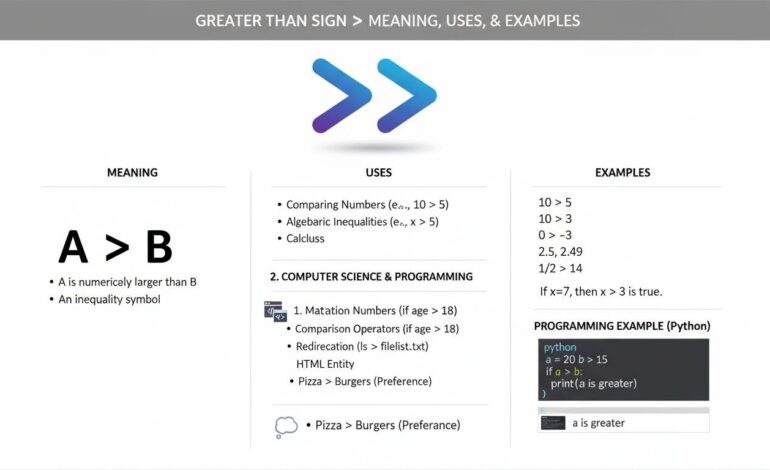
The greater-than sign “>” is a simple but versatile symbol. It’s used in math to show one value is larger than another, in programming to redirect output, and in web content to create blockquotes or arrows. While it might seem small and unimportant, this little character plays a big role across many fields.
Why the Greater-Than Sign Matters
In everyday math, we write “5 > 3” to say five is greater than three. That’s the clearest use of it. But if you look deeper, it’s kind of everywhere once you open your eyes. In logic, it helps set boundaries. In computer code, it can redirect where data goes, compare strings, or even be part of HTML tags. When you start noticing it, the symbol shows up in surprising places, sometimes in ways you might take for granted.
Mathematical Foundations
Basic Comparisons
At its core, the greater-than sign does one job: compare two values to show one is larger. It’s intuitive—pointing to the smaller value and leaning away. Kids learn it with fun mnemonics like the “alligator eats the bigger number.” Beyond that, it anchors a lot of problem-solving and decision-making in math, from simple arithmetic to advanced inequalities.
Advanced Uses in Algebra and Beyond
Inequalities get more interesting with “>” and its variants. You’ll see expressions like:
- Strict inequality: x > 7 — x must exceed 7
- Non-strict inequality: x ≥ 7 — x can be 7 or more
That little addition of a line changes if equality is allowed. Then in calculus and real analysis, you define intervals such as (a, ∞) which technically means a > x for all x in that interval.
Real-World Example: Finance
In finance, thresholds often guide decisions:
- “Revenue > expenses” means profitability.
- Stock analysts might flag metrics like “P/E ratio > industry average.”
- Loan approval models can be triggered if credit score > certain cutoff.
These comparisons inform big-money choices. It’s neat how a single symbol can carry such weight in decision-making.
Programming Roles of “>”
Output Redirection in Shells
In Unix-like shells (bash, zsh), “>” sends output from a command into a file:
bash

ls > filelist.txt
That simple line puts the directory listing into filelist.txt instead of showing it on screen. Add another “>” (>>) to append rather than overwrite. Super handy when scripting backups or logging events.
Comparison Operations
Most programming languages use “>” to compare values. For example in JavaScript:
js

if (score > highScore) {

  console.log("We have a new leaderboard champ!");

}
It’s crisp and clear. In Python, it’s the same. In SQL, you’d write WHERE age > 18 to filter adult users. So many lines of code carry that symbol quietly.
Redirecting in HTML/XML
Funny enough, in HTML/XML the greater-than sign is part of markup syntax:
“`html
This is a paragraph.
“`
Here, “>” closes tags. It’s vital for defining structure. More subtle uses include entities like > to render “>” in content. Without it, you break pages or confuse browsers.
Greater-Than in Data and Logic Structures
Arrays and Loops in Code
When looping through arrays or collections, comparisons guide flow:
python

for number in nums:

    if number > threshold:

        print(number)
This snippet filters values above a threshold. Handy for stats, graphs, filtering sensors, you name it.
Conditional Logic & Boolean Expressions
Comparisons like > feed into logical expressions:
c

if (a > b && b > c) {

    // some logic

}
Here, > works with && (AND) to form compound conditions. Big systems rely on such logic chains—think AI rules, game mechanics, business rules engines.
Typos, Common Mistakes, and Ambiguities
Swapping with Less-Than
One frequent slip? Writing < instead of >, or vice versa. It flips logic, often with hilarious or disastrous consequences. A perfect example: if (x < 10) instead of x > 10. Testers cringe when that’s discovered.
Encoding Mishaps
In HTML, forgetting to escape the symbol when you want plain text can break your layout. Example:
html

I love 3 > 2
Browsers will misinterpret that tag. Instead, write:
html

I love 3 > 2
This ensures correct rendering. These details matter in content and UI work.
Real-World Story: How “>” Saved a Night
One time, a dev worked on a script to transfer logs nightly. They used:
bash

mv logs/* backup/
But they mistakenly swapped direction:
bash

backup/ > logs/*
That sucked—cleared their logs folder. After a frantic few hours recovering backups, they added a comment:
“`bash
remember: > means output redirection or comparison, not move direction
“`
This little slip reminds you how critical context and placement are. It’s simple but easily flips logic.
Why It Still Matters Today
In Data Science and AI
Even in modern AI pipelines, comparisons with > help define thresholds—like when to trigger an alert, schedule retraining, or filter anomalies. That’s behind many unsung guardrails.
Code Readability and Maintainability
A well-placed > inside clean code signals intent. It helps others follow your logic quickly. When code reads like plain language, teams move faster. Compare:
js

if (temperature > safeLimit) { alert(); }
versus something vague. One symbol, clear message.
Expert Voice
“The greater-than sign is often underestimated in its power. It’s a quiet workhorse—driving decisions, shaping logic, and organizing content across platforms.”
— Jesse Tanner, Senior Systems Architect
This rings true across domains—from cloud logs to classroom whiteboards.
Choosing the Right Context for “>”
Math vs. Programming
In math, > is all about comparison. In code, it gains extra magic—redirecting, closing tags, piping. Still, the root is comparison. Always ask: am I comparing values, directing output, or structuring markup?
Avoiding Ambiguity
- In plain text, use
>in HTML to avoid misreads. - In code, wrap comparisons with parentheses when needed. For example:
js

if ((a + b) > c) { … }
That clears grouping and intent.
Summary of Uses
- Mathematics: Basic comparisons (
3 > 2), inequalities (x ≥ 7) - Programming: Comparison operators, test conditions (
if (x > y)), output redirection (>), tag syntax in HTML/XML - Data & Logic: Filters, thresholds, compound conditions (
a > b && b > c) - UI/Web: Escaped content (
>) to display “>” safely
Concluding Thoughts
The greater-than sign may seem tiny, but don’t underestimate it. It’s a shape-shifting little tool. Whether you’re solving math problems, writing scripts, building websites, or analyzing data, it plays a role. And sometimes a small symbol can make a huge difference—especially when things go sideways. Keep it in mind. It’s simple. But strong.
FAQs
Why is the greater-than sign shaped like that?
It’s intuitive: the open side faces larger numbers, as if the symbol is “bearing its teeth” at the smaller value. It’s a long-held visual convention that clicks quickly.
How do I type the greater-than sign on different keyboards?
Most keyboards have it on the same key as the period, so you press Shift + “.”. On mobile keyboards, open the symbols panel to find > and <.
Can I use “>” in HTML safely?
Yes, but if you need to show it as content rather than as a tag, use its HTML entity >. That way it won’t be confused with markup.
What’s the difference between “>” and “>=”?
> means strictly greater than. >= means greater than or equal to. In math, that bit line changes your solution set; in code, it changes whether equality qualifies too.
What happens if I swap “>” and “<” in code?
Logic flips. A filter that should catch large values ends up catching small ones. It’s a basic bug but can cause big confusion. That’s why double-checking comparisons is a must.
Is the greater-than sign used in logic or AI models?
Absolutely. It defines thresholds—like “if probability > 0.8, flag this.” It’s a fundamental guard in many decision-making pipelines.
This covers the greater-than sign’s meaning, uses, and real-life examples. Small symbol, big impact.