Best Wireless Headphones for Gaming & Streaming – Top Picks

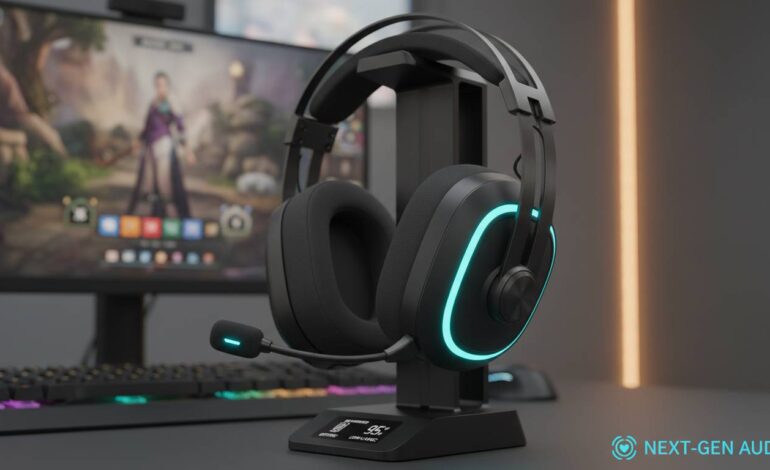
Picking wireless headphones for gaming and streaming isn’t about grabbing the most expensive headset you can find. You need crystal-clear audio, latency low enough that your viewers never notice delays, and a microphone that makes your voice sound professional without requiring a separate broadcast setup. After testing dozens of models across multiple price points, here are the wireless headphones that actually deliver when you’re live on Twitch, YouTube, or any streaming platform.
What Makes Headphones Great for Streaming
Before getting into specific recommendations, it’s worth understanding what separates a good gaming headset from one that’ll actually work for streaming. The key differences come down to microphone quality, latency, and comfort during those marathon sessions that can last six hours or more.
Most gamers focus on sound isolation and bass response, which matter for competitive play. But streamers need to hear their game audio, voice chat, and stream alerts simultaneously while also making sure their own voice sounds clean to their audience. That’s a different balancing act than just gaming alone.
The wireless connection also needs to be rock-solid. Bluetooth can work, but dedicated 2.4GHz wireless adapters typically provide lower latency and more stable connections—crucial when every millisecond counts during fast-paced gameplay that you’re broadcasting live.
Our Top Pick: SteelSeries Arctis Nova Pro Wireless
The SteelSeries Arctis Nova Pro Wireless is the most versatile option for serious streamers who also take their gaming seriously. These headphones have a swappable battery system that lets you hot-swap power cells without interrupting your stream—a genuinely useful feature that many competitors overlook.
The microphone quality here deserves special mention. It uses a bidirectional noise-canceling design that does an impressive job of filtering out keyboard clicks and ambient room noise, which is exactly what you need when you’re streaming and don’t want your mechanical keyboard to drown out your voice. Several professional streamers have adopted this model specifically because it reduces the need for heavy post-processing on their audio.
Audio quality is exceptionally balanced across the frequency spectrum, meaning you can hear directional footsteps in competitive games while still appreciating the fuller sound of music and stream alerts. The companion software lets you create separate audio profiles for different streaming scenarios, which is handy if you switch between games that have very different audio mixes.
Battery life reaches around 36 hours with the 2.4GHz wireless connection, and the quick-charge feature gives you several hours of use from just a 15-minute charge. That’s enough to get through most streaming sessions without worrying about your headset dying mid-broadcast.
The Arctis Nova Pro Wireless hits the sweet spot between professional-grade audio for streaming and the low-latency performance that competitive gaming demands. The microphone alone justifies the premium price for anyone serious about their stream quality.
Best Overall Value: Razer BlackShark V2 Pro
If the SteelSeries option feels like overkill for your setup, the Razer BlackShark V2 Pro delivers most of what you need at a significantly lower price point. Razer has refined their gaming audio line over multiple generations, and this model shows that experience.
The highlight here is the THX Spatial Audio support, which creates a more immersive soundstage than standard stereo. For competitive games, that spatial awareness can actually help you locate enemies more precisely, which is a genuine gameplay advantage. For streaming, it simply makes your audio experience more engaging.
The microphone uses Razer HyperClear technology with advanced noise cancellation. It’s not quite at the broadcast-quality level of the SteelSeries, but for most streaming setups and typical room environments, it performs admirably. You’ll still want to run some basic noise gate settings in OBS, but you won’t need a full podcast recording setup.
Comfort-wise, these are lightweight enough that you can wear them for extended streaming sessions without experiencing the clamp pressure that plagues some gaming headsets. The breathable mesh fabric on the ear cushions helps significantly with heat buildup during long sessions.
Battery life comes in around 70 hours when using 2.4GHz wireless, which is genuinely impressive and one of the longest-lasting options in this category. You could realistically stream for an entire week without needing to recharge.
Best Budget Option: HyperX Cloud III Wireless
Not everyone needs to spend over $300 on headphones, and the HyperX Cloud III Wireless proves you can get solid streaming performance without breaking the bank. HyperX has built a reputation for delivering reliable gaming peripherals at reasonable prices, and this model continues that tradition.
The sound profile is tuned more toward bass emphasis, which makes games feel exciting and helps stream alerts cut through background audio. It’s not as refined as premium options, but it works well for the casual streaming use case. The microphone is detachable, which is convenient if you want to use these as regular wireless headphones when you’re not streaming.
These connect via 2.4GHz wireless with a USB-C dongle, providing the low-latency connection you need. The battery lasts around 20 hours, which is respectable though not exceptional. For most streaming sessions, that’ll cover a full evening without issues.
The build quality feels solid for the price, though the plastic construction is noticeably less premium than higher-end options. That’s expected at this price point and doesn’t necessarily indicate poor durability—it just means you won’t get the metal accents and premium materials of more expensive models.
Best Premium Option: Logitech G Pro X Wireless
Logitech’s G Pro X Wireless targets the professional streaming and esports audience with features specifically designed for content creators. The Blue VO!CE microphone technology built into these headphones lets you apply broadcast-quality voice effects directly from the headset, which is a significant advantage for streamers who want professional-sounding audio without investing in separate processing hardware.
The 50mm drivers deliver clean, detailed audio with good staging for competitive gaming. You can hear positional audio clearly, which matters for games like Valorant, CS2, or any competitive shooter where audio cues give you tactical advantages.
The wireless range is excellent, letting you move around your streaming space without dropouts. This matters more than you might think when you’re reacting to chat, adjusting your lighting, or grabbing water during longer streams. The last thing you want is your audio cutting out because you stepped a few feet away from your receiver.
At around 20 hours of battery life, it’s not the longest-lasting option, but it’s sufficient for most streaming sessions. The quick-charge feature helps mitigate this, giving you a few hours from a short charging break.
Best for Audiophiles Who Stream: Sony INZONE H9
If you care about music production, podcasting, or simply want the most accurate audio reproduction possible, the Sony INZONE H9 brings Sony’s audio engineering expertise to the gaming space. These headphones borrow heavily from Sony’s consumer audio division, meaning you get the same driver technology that powers their premium headphones.
The noise cancellation is genuinely useful for streaming, especially if you’re in a less-than-ideal environment. It won’t eliminate keyboard noise completely, but it significantly reduces ambient sounds that might otherwise interfere with your broadcast. The ambient sound mode is handy for quick conversations with people in your room without removing your headset.
The microphone quality is solid though not exceptional—it gets the job done for streaming but won’t replace a dedicated broadcast mic if you’re pursuing maximum audio fidelity. However, many streamers appreciate having everything integrated into one device for convenience.
Battery life reaches around 32 hours with noise cancellation enabled, which is competitive with other premium options. The included USB-C dongle provides the low-latency connection you need for streaming without the complications of Bluetooth pairing.
How We Test Wireless Headphones for Streaming
Our testing process focuses on the specific requirements that streamers have, rather than just general gaming performance.
For microphone testing, we record voice samples in multiple environments—quiet rooms, spaces with background noise, and conditions with keyboard and mouse clicking. We evaluate how well the noise cancellation handles common streaming distractions and assess whether the resulting audio needs post-processing to sound professional.
For latency measurement, we use specialized audio equipment to test the wireless latency of each headset. For streaming, anything under 20 milliseconds is excellent, while anything above 40 milliseconds may cause noticeable delays between in-game events and what your audience hears.
For comfort assessment, we wear each headset for minimum four-hour sessions to evaluate comfort during extended streaming use. We specifically look for ear fatigue, headband pressure, and heat buildup that becomes problematic during longer broadcasts.
For battery real-world testing, rather than relying on manufacturer claims, we test battery life during actual streaming use with typical volume levels. Manufacturer numbers are often achieved under optimal conditions that don’t reflect real-world usage.
Key Features to Look for in Streaming Headphones
When evaluating wireless headphones specifically for streaming, certain features deserve extra attention beyond what you’d look for in a regular gaming headset.
Microphone quality and noise cancellation is probably the most important consideration for streaming. Look for headsets with dedicated noise-canceling microphones, preferably with some form of environmental noise suppression. The better the built-in microphone, the less post-processing you’ll need in OBS or your streaming software.
Low-latency wireless connection matters because Bluetooth headphones can introduce noticeable audio delay, which becomes problematic when streaming fast-paced games. Dedicated 2.4GHz wireless adapters typically provide the sub-20ms latency needed for seamless streaming. Some newer Bluetooth implementations approach these speeds, but wired-style wireless still leads.
Comfort for long sessions is crucial since streaming sessions easily exceed three hours, sometimes stretching to six or eight. The most comfortable headphones use breathable materials, balanced weight distribution, and earcups that don’t generate excessive heat. Memory foam padding with fabric covers generally outperforms leatherette alternatives for extended wear.
Multi-device pairing is worth considering since many streamers use multiple devices—PC for games, console for different games, phone for music between games. Some headphones can maintain connections to multiple devices simultaneously, letting you switch audio sources without re-pairing.
Battery life is important because nothing kills a stream faster than headphones dying mid-broadcast. Look for models with at least 15-20 hours of battery life, and consider whether quick-charging features are important for your streaming schedule.
Understanding Latency for Streaming
One common concern among new streamers is whether wireless headphones will introduce lag that viewers notice. The reality is more nuanced than a simple yes or no answer.
Modern wireless gaming headphones using 2.4GHz connections typically achieve latency between 10-30 milliseconds. Human perception generally can’t detect delays under 20 milliseconds, meaning most users won’t notice any audio lag at all. The game audio you hear will be synchronized with what viewers see if your stream encoding is properly configured.
Bluetooth headphones are more variable. Older Bluetooth implementations can introduce 100ms or more of delay, which becomes noticeable. However, newer Bluetooth standards like LE Audio and aptX Low Latency have significantly improved this. If you’re using Bluetooth, verify that your headphones and source device both support low-latency codecs.
For most streaming scenarios, a quality 2.4GHz gaming headset will perform perfectly fine. The more important consideration is making sure your stream encoding settings don’t introduce additional audio delay on the viewer side.
Connecting Your Headphones to Streaming Software
Getting your wireless headphones working with OBS, Streamlabs, or other streaming software is usually straightforward, but there are some best practices worth following.
First, ensure your headphones are connected to your PC via the dedicated wireless adapter rather than Bluetooth if your headset offers both options. The dedicated adapter typically provides lower latency and more stable performance.
In your streaming software, set your headphones as both the audio output device (so you can hear the game and chat) and the input device (for your headset microphone). Most streaming software allows you to monitor your microphone input, which helps you catch audio issues before going live.
Consider adding noise suppression and noise gate filters to your microphone track in your streaming software. Even the best headset microphones benefit from some post-processing to remove keyboard clicks and other ambient sounds that distract viewers.
Conclusion
Choosing the right wireless headphones for streaming ultimately depends on your specific needs, budget, and how serious you are about your broadcast quality. The SteelSeries Arctis Nova Pro Wireless earns our top recommendation for serious streamers who want the best combination of microphone quality, comfort, and audio performance. The Razer BlackShark V2 Pro offers exceptional value if you want most of those features without the premium price. Budget-conscious streamers will find the HyperX Cloud III Wireless more than capable for casual streaming use.
Remember that your headphone choice interacts with other elements of your streaming setup—your microphone, your room acoustics, and your stream encoding all affect the final experience your viewers receive. Investing in quality audio on the front end makes post-processing easier and results in a more professional-sounding stream that keeps viewers engaged.
Start with the option that fits your budget, test it during actual streaming sessions, and don’t hesitate to adjust your OBS audio settings to get the best results. The right headphones, properly configured, make a noticeable difference in how professional your stream sounds to your audience.
FAQs
What wireless headphones do professional streamers use?
Professional streamers often use premium gaming headsets like the SteelSeries Arctis Nova Pro, Logitech G Pro X, or Razer BlackShark V2 Pro. Many also pair these with dedicated broadcast microphones like the Shure SM7B for their voice audio while using headphones purely for game audio monitoring.
Are wireless headphones good for live streaming?
Yes, modern wireless headphones work excellently for live streaming, provided they use low-latency wireless technology (2.4GHz recommended over Bluetooth) and have a decent built-in microphone. The key is choosing models specifically designed for gaming that balance microphone quality with audio performance.
Do wireless headphones have audio lag for streaming?
Quality gaming headsets using 2.4GHz wireless typically have latency under 30 milliseconds, which is imperceptible to viewers. Bluetooth headphones may introduce more noticeable delay depending on the codec used. For competitive gaming and streaming, wired USB or dedicated wireless adapters are recommended.
What’s the best budget wireless headphone for streaming under $100?
The HyperX Cloud III Wireless offers the best balance of price and performance for streamers on a budget. It provides decent microphone quality, comfortable design for extended use, and reliable wireless connectivity without breaking the bank.
Can I use wireless headphones for both gaming and streaming?
Absolutely. Gaming headsets with wireless connectivity are designed to work with both gaming and general audio use. Most support simultaneous connections to multiple devices, letting you game on PC or console and switch to music or phone calls when not streaming.
How important is microphone quality in streaming headphones?
Microphone quality is critically important for streaming because your voice is one of the primary ways viewers connect with you. Headset microphones vary significantly in quality—investing in a model with good noise cancellation and clear voice reproduction reduces the need for heavy post-processing and makes your stream sound more professional.