Best Wireless Headphones for Gaming Review – Top 10 Picks

Tired of sorting through endless mediocre options? I’ve spent weeks testing the top wireless gaming headsets so you don’t have to. Whether you’re grinding ranked matches in Valorant, kicking back with single-player games, or need something that works for gaming and daily use, I’ve got you covered with honest takes on what actually performs.
Quick Picks
No time to read the full breakdown? Here’s the shorthand:
Best Overall: Logitech G Pro X 2 — Great sound, comfortable, reliable 2.4GHz connection. Worth the money if you can swing it.
Best Premium: SteelSeries Arctis Nova Pro — Expensive as hell, but the hot-swappable batteries are genuinely convenient and the audio is fantastic.
Best Budget: HyperX Cloud III Wireless — Under $100 and genuinely good. Rare combination.
Let’s get into the details.
How I Tested These
Here’s my testing process so you know what you’re getting.
I check latency across connection types — 2.4GHz, Bluetooth, USB — using both actual gameplay and audio lag tests. For sound quality, I play everything from competitive shooters to RPGs, plus music and movies because most people use their headset for more than gaming.
Comfort gets evaluated over multi-hour sessions. I note how the ear cups feel, whether the headband digs, and if things get sweaty.
Microphone testing involves real calls and game chat with background noise present. Battery life gets measured at moderate volume until the headset dies, then I compare against the manufacturer’s claims.
I also factor in software, build quality, and whether the price matches what you’re actually getting.
Best Overall: Logitech G Pro X 2
The Logitech G Pro X 2 takes the top spot. These hit the sweet spot between performance and everyday usability that most gamers actually need.
The 50mm graphene drivers sound excellent. Audio is detailed with punchy bass and clear highs. In competitive games, footsteps and reloads come through distinctly, and the soundstage is wide enough to give you a real sense of where sounds are coming from without feeling artificial.
At 345 grams, these are light enough for long sessions. The mesh fabric on the ear cups breathes better than the leather-style pads on many competing headsets — your ears won’t feel like a sauna after a few hours.
The mic sounds good. Blue VO!CE gives you some voice modulation options, and the noise rejection keeps keyboard clicks from annoying your teammates.
Battery life sits around 50 hours with 2.4GHz — plenty for a week of regular gaming. USB-C charging means you can grab a cable from your phone if you need a top-up.
The main downside is the $200 price tag. It’s fair for what you’re getting, but it’s not nothing. If your budget is tight, the HyperX Cloud III below is worth considering.
Pros & Cons
Pros: Excellent sound quality, comfortable for long sessions, good microphone, reliable low-latency connection, 50-hour battery life, solid build quality.
Cons: $200 isn’t cheap, Logitech’s software can be overwhelming at first, no Bluetooth — just 2.4GHz.
Key Specifications
- Driver Size: 50mm graphene
- Connection: 2.4GHz wireless (USB-C dongle)
- Battery Life: ~50 hours
- Weight: 345g
- Microphone: Detachable with Blue VO!CE
- Surround Sound: DTS Headphone:X 2.0
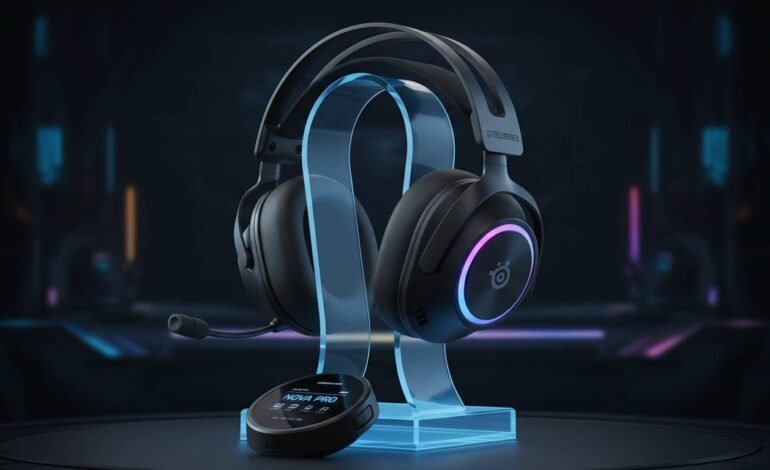
Best Premium: SteelSeries Arctis Nova Pro
If price doesn’t matter and you want the best of the best, the Arctis Nova Pro delivers.
The build quality is immediately obvious. Steel frame headband, solid hinges, premium materials everywhere. The swappable battery system is genuinely useful — one battery charges in the dock while you use the other. No waiting for a charge when you want to keep playing.
Audio performance is fantastic. The 40mm drivers produce rich, detailed sound across the frequency range. SteelSeries’ Sonar software gives you a 10-band EQ and solid game/chat mixing, though it takes some time to learn.
The soundstage is impressively wide for a closed-back headset. Positional audio in competitive games is accurate — you’ll hear exactly where enemies are approaching from.
Comfort is great thanks to the AirWeave cushions. They stay relatively cool and create a good seal without clamping too hard.
Pros & Cons
Pros: Swappable batteries are awesome, best-in-class audio, premium build, excellent noise isolation, comfortable for hours, works on PC, PS5, and Xbox.
Cons: $350 is a lot, heavy at 490g, Sonar software has a learning curve, Bluetooth and 2.4GHz can’t run simultaneously.
Key Specifications
- Driver Size: 40mm Neodymium
- Connection: 2.4GHz + Bluetooth (separate)
- Battery Life: ~44 hours (swappable)
- Weight: 490g
- Microphone: ClearCast Gen 2
- Surround Sound: 360° Spatial Audio
Best Budget: HyperX Cloud III Wireless
Not looking to spend $200+? The HyperX Cloud III Wireless is the best budget option by a clear margin. At around $100, these punch well above their weight.
The 53mm drivers sound good. Bass has some punch without muddying the mids, and high frequencies are clear enough to catch important game sounds. Compared to headsets twice the price, it’s not a huge gap.
The microphone is surprisingly solid. It captures your voice clearly and rejects background noise decently. Your teammates won’t think you’re using a cheap headset.
Comfort is where HyperX consistently delivers, and the Cloud III continues that. Memory foam cushions are plush, the headband distributes weight evenly, and these are comfortable enough for all-day gaming.
Battery life is absurd at around 120 hours. You might charge these once a month. It’s honestly overkill, but I’d rather have too much battery than not enough.
The trade-off is features. There’s no surround sound, no EQ app, no fancy software. These are plug-and-play. For most gamers, that’s honestly fine — you just want it to work.
Pros & Cons
Pros: Insane 120-hour battery, great value at ~$100, comfortable, solid sound, simple setup, decent mic.
Cons: No app or EQ, no surround sound, basic design, limited features compared to premium options.
Key Specifications
- Driver Size: 53mm custom dynamic
- Connection: 2.4GHz wireless (USB-A dongle)
- Battery Life: ~120 hours
- Weight: 300g
- Microphone: Detachable noise-canceling
- Surround Sound: None (stereo only)
Best for Battery Life: Razer BlackShark V2 Pro
If you forget to charge things constantly, the BlackShark V2 Pro’s 70-hour battery will be a relief. That’s exceptional for a premium headset.
Audio holds up against the competition. THX Spatial Audio works well for competitive gaming, and the 50mm TriForce titanium drivers deliver detailed sound across the range.
At 262g, these are lightweight — great for long tournament matches or marathon sessions. The ear cups block out a decent amount of ambient noise passively.
The hyperclear cardioid mic rejects sounds from the sides and rear well. If you have a noisy setup, your voice still comes through clearly.
One annoyance: the volume wheel is on the bottom of one ear cup. You’ll accidentally adjust it when putting the headset on or taking it off until you get used to it.
Pros & Cons
Pros: Great 70-hour battery, lightweight, THX audio is solid, good noise-rejecting mic, comfortable, good value at ~$170.
Cons: Volume wheel position is awkward, Razer’s software could be cleaner, no Bluetooth.
Key Specifications
- Driver Size: 50mm TriForce Titanium
- Connection: 2.4GHz wireless
- Battery Life: ~70 hours
- Weight: 262g
- Microphone: HyperClear cardioid
- Surround Sound: THX Spatial Audio
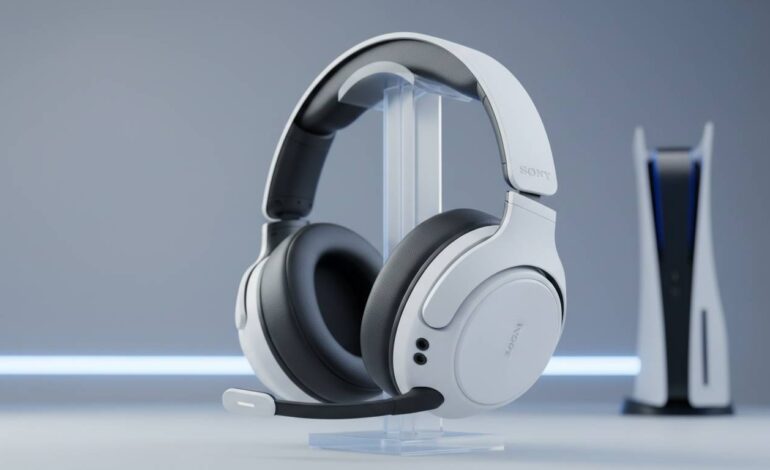
Best for Console Gamers: Sony INZONE H9
PlayStation owners, this one’s tailored for you. The INZONE H9 integrates tightly with the PS5 — instant pairing, on-screen battery display, and support for Tempest 3D AudioTech. That last one actually sounds good on PlayStation, not just marketing.
Sound quality is clean and balanced. Not bass-heavy, which makes these comfortable for long sessions. Works well for games, movies, and music.
The dual-sense haptics add subtle vibrations during gameplay. It’s a nice bonus that makes the headset feel designed for PlayStation, though it’s not reason enough to buy on its own.
Battery life is about 32 hours — fine, not exceptional. The charging stand makes topping up easy.
The $250 price is mainly for the PS5 integration. If you’re on PC, there are better values. And if you don’t own a PS5, look elsewhere.
Pros & Cons
Pros: Perfect PS5 integration, excellent 3D audio on PS5, comfortable, haptic feedback, premium build, charging stand included.
Cons: Expensive at $250, 32-hour battery is average, limited functionality outside PlayStation, haptics only work with PS5.
Key Specifications
- Driver Size: 40mm
- Connection: 2.4GHz wireless + Bluetooth
- Battery Life: ~32 hours
- Weight: 435g
- Microphone: Flexible boom (flip-to-mute)
- Surround Sound: Tempest 3D AudioTech (PS5)
Best for Low Latency: Corsair Virtuoso RGB Elite
For competitive gaming where lag matters, the Corsair Virtuoso RGB Elite delivers. Corsair’s Slipstream wireless is among the fastest you can get.
Audio is excellent. 50mm custom-tuned drivers produce rich sound with strong bass. The soundstage is wide, giving good positional awareness for competitive play.
The build quality impresses. Brushed aluminum frame feels premium, memory foam cushions are comfortable. At 390g, they’re not the lightest, but weight distribution is good.
The 24-bit/96kHz audio over USB is a nice bonus if your system supports it. You get noticeably better quality than standard wireless. Mostly matters to audiophiles and competitive players chasing every advantage.
RGB lighting syncs with iCUE if you have other Corsair gear. It’s not essential, but some people enjoy the aesthetic.
Pros & Cons
Pros: Extremely low latency, premium aluminum build, high-res audio option, great sound, comfortable, detachable mic.
Cons: $180 isn’t cheap, heavy at 390g, RGB drains battery, iCUE can be resource-heavy.
Key Specifications
- Driver Size: 50mm custom-tuned neodymium
- Connection: Slipstream 2.4GHz + Bluetooth
- Battery Life: ~60 hours (without RGB)
- Weight: 390g
- Microphone: Detachable 9.5mm broadcast-grade
- Surround Sound: Spatial Audio via iCUE
Best for Streaming: RODE NTH-100M
Streamers have different needs than regular gamers. The RODE NTH-100M is built for content creators who need professional audio while staying wireless.
Audio quality is exceptional. RODE makes microphones, and that expertise carries over. The 40mm drivers deliver neutral, accurate sound perfect for voice work.
The microphone is the highlight. Connected via flexible boom arm, it uses RODE’s mic technology. Your voice sounds broadcast-ready — exactly what streaming demands.
Comfort is excellent for long streams. Cooling gel-infused cushions stay comfortable for hours, and the headband is well-padded.
The catch is platform support. Bluetooth connectivity means some consoles won’t work. These are designed for PC streaming setups. Console gamers should look elsewhere.
At $300, these aren’t cheap. For professional streamers, the audio quality justifies the cost. For regular gaming, they’re overkill.
Pros & Cons
Pros: Broadcast-quality mic, excellent audio, comfortable for long sessions, professional voice quality, sleek look, Bluetooth flexibility.
Cons: $300 is expensive, Bluetooth only (no 2.4GHz), limited console support, not ideal for pure gaming without streaming.
Key Specifications
- Driver Size: 40mm custom dynamic
- Connection: Bluetooth 5.0
- Battery Life: ~30 hours
- Weight: 340g
- Microphone: Detachable boom (broadcast-quality)
- Surround Sound: None (audiophile-grade stereo)
Comparison Table
| Product | Price | Battery | Weight | Connection | Driver |
|---|---|---|---|---|---|
| Logitech G Pro X 2 | ~$200 | 50 hrs | 345g | 2.4GHz | 50mm |
| SteelSeries Arctis Nova Pro | ~$350 | 44 hrs (swappable) | 490g | 2.4GHz + BT | 40mm |
| HyperX Cloud III | ~$100 | 120 hrs | 300g | 2.4GHz | 53mm |
| Razer BlackShark V2 Pro | ~$170 | 70 hrs | 262g | 2.4GHz | 50mm |
| Sony INZONE H9 | ~$250 | 32 hrs | 435g | 2.4GHz + BT | 40mm |
| Corsair Virtuoso RGB Elite | ~$180 | 60 hrs | 390g | Slipstream + BT | 50mm |
| RODE NTH-100M | ~$300 | 30 hrs | 340g | Bluetooth | 40mm |
What to Look for When Buying
Here are the key factors that actually matter.
Latency
Latency matters most for competitive gaming. Audio arriving slightly after visuals throws off your timing in fast games.
2.4GHz wireless gives the lowest latency, typically under 20ms. Bluetooth runs higher, often 40-100ms+. For competitive play, 2.4GHz is the way to go.
Most modern gaming headsets use 2.4GHz and perform well. Unless you’re extremely sensitive to lag, you won’t notice the difference between wired and low-latency wireless.
Battery Life
Battery life varies a lot. Budget options like the HyperX Cloud III hit 100+ hours. Premium headsets with RGB lighting might manage 30-40 hours.
Consider your habits. Heavy daily gaming means longer battery matters more. Occasional play means you can get by with less.
Fast charging is useful. Some headsets give several hours from a 15-minute charge.
Surround Sound
Virtual surround sound helps in games where positional audio matters. Hearing exactly where an enemy is approaching can decide a fight.
Most gaming headsets offer surround through THX, DTS, or platform-specific solutions like Sony’s Tempest 3D.
That said, stereo works fine for most games. Many competitive players actually prefer stereo — some virtual surround solutions muddy positional clarity.
Microphone Quality
If you play online with others, mic quality matters. A good gaming mic transmits your voice clearly while rejecting keyboard clicks, background noise, and room echo.
Most premium headsets have solid mics. The best ones — Blue VO!CE, ClearCast — make you sound professional.
Streamers should consider a dedicated broadcast mic. The RODE NTH-100M combines wireless freedom with professional voice quality.
Comfort
Gaming sessions often last hours. Look for plush ear cushions, preferably with cooling gel or breathable fabric. Memory foam usually feels best.
Weight affects long sessions. Lighter headsets reduce neck fatigue, though they sometimes sacrifice build quality or features.
Try before buying if you can. Head shapes differ — what feels great on one person might not work for another.
Conclusion
The right headset depends on your needs and budget. The Logitech G Pro X 2 is my top recommendation — excellent audio, comfortable, reliable wireless. The SteelSeries Arctis Nova Pro is worth it if you want the absolute best and price is no object. Gamers on a budget will appreciate the HyperX Cloud III Wireless.
Console players on PlayStation should look at the Sony INZONE H9. Competitive gamers chasing low latency should consider the Corsair Virtuoso RGB Elite. Professional streamers will benefit from the RODE NTH-100M’s broadcast-quality mic.
Any of these will serve you well. Find what fits your setup, your budget, and how you actually play.
FAQs
Are wireless headphones good for gaming?
Yes. Modern 2.4GHz wireless technology has advanced enough that even professional competitive gamers use wireless headsets. The latency is low enough to be indistinguishable from wired in all but the most demanding situations. The convenience of no cables makes wireless the easy choice for most people.
Is 2.4GHz or Bluetooth better for gaming?
2.4GHz is better for gaming. Lower latency and more stable connections. Bluetooth introduces more lag and can stutter in busy wireless environments. Use Bluetooth for casual gaming or connecting to phones and tablets, but stick with 2.4GHz for serious competitive play.
How much should I spend on gaming headphones?
$100-200 gets you an excellent wireless gaming headset with great audio, comfort, and reliable performance. Budget options under $100 like the HyperX Cloud III offer impressive value. Premium headsets above $200 have better build quality and features, but the improvement might not matter for casual use.
Do I need surround sound for gaming?
Not strictly. Many competitive players actually prefer good stereo audio, which can provide clearer positional information than some virtual surround solutions. Surround sound enhances immersion in single-player games and helps with spatial awareness in competitive titles. Most gaming headsets include some form of virtual surround, so you’ll have the option either way.
How long do wireless gaming headphones last?
3-5 years with proper care. The battery is the weak link — lithium batteries degrade over time, typically losing around 20% capacity after 2-3 years of regular use. Don’t let batteries drain completely, don’t leave them plugged in at 100% constantly, and your headset will last longer. Physical build quality of premium headsets also contributes to longevity.
Can I use wireless gaming headphones with multiple devices?
Many support multiple connection types, letting you switch between devices. Some offer both 2.4GHz and Bluetooth — use the dongle for your gaming PC and Bluetooth for your phone. Most can’t connect to two devices simultaneously through the same connection type. Check the specs if you need to use your headset across multiple platforms regularly.