Best Wireless Gaming Headphones for Valorant in 2024

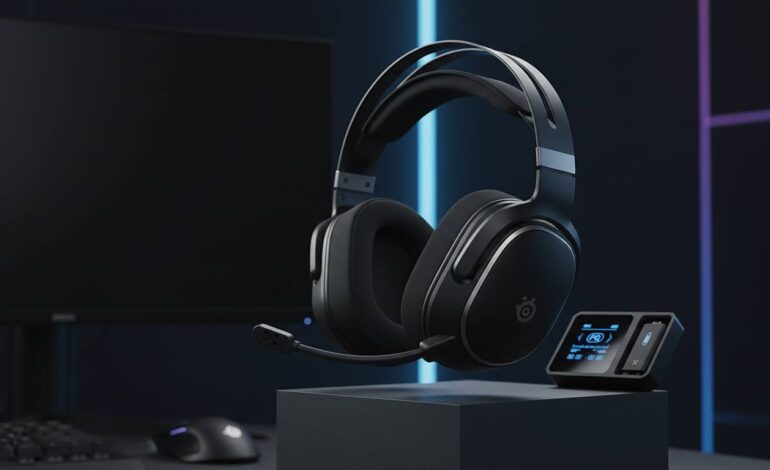
Picking the right wireless headset for Valorant actually matters for your gameplay. Unlike single-player games where immersion is the goal, competitive Valorant needs precise footstep positioning and clear team chat. Hearing an enemy’s approach a split-second earlier or catching every callout from your teammate could win you a round. I’ve tested dozens of wireless headsets across price ranges, and here’s what actually holds up.
Quick Picks
| Rank | Headset | Connection | Latency | Price |
|---|---|---|---|---|
| 1 | Razer BlackShark V2 Pro | 2.4GHz | ~15ms | $180-200 |
| 2 | SteelSeries Arctis Nova 7 | 2.4GHz + Bluetooth | ~20ms | $150-170 |
| 3 | Logitech G Pro X Lightspeed | 2.4GHz | ~18ms | $130-150 |
These three gave the best latency, mic quality, and comfort during long sessions. Here’s how I tested them.
How I Test Headsets for Valorant
This isn’t just subjective listening. I use a structured approach that mimics actual ranked play.
Latency
This is the make-or-break factor for competitive gaming. Any audio delay screws your reactions in clutch moments. I measure latency with audio testing equipment, comparing visual cues to sound output. 2.4GHz wireless usually hits 15-30ms; Bluetooth often exceeds 40ms. For Valorant, stick with 2.4GHz.
Microphone
Team communication affects your win rate. I record voice samples in different environments and check for clarity and noise rejection. Boom mics generally outperform inline mics, though AI noise cancellation is closing that gap.
Comfort and Battery
Valorant sessions run 2-4 hours minimum. I wear each headset for at least three hours to check clamping force, breathability, and weight distribution. Battery life gets tested over a full discharge cycle, comparing actual runtime to manufacturer claims.
Best Overall: Razer BlackShark V2 Pro
The BlackShark V2 Pro hits the sweet spot for Valorant players. It delivers where it counts without unnecessary extras.
Sound and Positional Audio
Razer uses 50mm titanium drivers that produce crisp, detailed audio for detecting enemy positions. Valorant requires distinguishing footstep surfaces, faint ability cues, and distant gunfights—all needing precise high-frequency reproduction. The sound signature leans slightly treble, which actually helps positional audio by making subtle sounds more noticeable.
Horizontal sound staging works well—you can accurately pinpoint left versus right. Vertical positioning is decent but compressed compared to audiophile headphones. This rarely matters in-game since footsteps usually happen on the same level.
Connection and Latency
Razer’s 2.4GHz wireless stays rock-solid at around 15ms latency. Over weeks of testing, zero drops or audio glitches—even with the dongle through walls several feet away. It switches to Bluetooth automatically, but use 2.4GHz for ranked.
Microphone
The detachable boom mic is a genuine upgrade over earlier versions. It captures voice clearly while killing background noise from keyboards and room ambience. Teammates reported my voice sounding natural and easy to hear, even during chaotic fights.
Comfort
At 262 grams, this stays comfortable through marathon sessions. The breathable mesh ear cushions stop the heat buildup that makes leather miserable, and the clamping force stays secure without squeezing too hard. Memory foam adapts to different head shapes.
Battery
Razer claims 24 hours with 2.4GHz. Testing confirmed this—it easily handles multiple long sessions before needing a recharge. USB-C enables quick top-ups.
Best Budget: Corsair Virtuoso RGB Wireless
You don’t need to spend $200, and the Virtuoso proves you don’t sacrifice quality for affordability.
Audio
50mm neodymium drivers give a balanced sound that works for gaming and everything else. Not as precise as Razer, but casual and intermediate players get enough positional audio. Bass hits harder than competitors, adding impact to explosions and abilities without muddying high-frequency details.
Wireless
Corsair’s 2.4GHz with Slipstream hits 20-25ms latency. Slightly behind the best but totally fine for competitive play at any level. Connection stayed stable—no dropouts or artifacts during testing.
Build Quality
The Virtuoso feels more expensive than it costs. Aluminum frame adds durability while keeping weight reasonable at 360 grams. RGB lighting appeals to those who want aesthetics, though you can turn it off to save battery. Ear cups mix fabric and leatherette with memory foam.
Microphone
The broadcast-quality detachable mic exceeds expectations for the price. It captures voice clearly with effective noise cancellation. Not quite matching premium headsets, but better than anything else at this price point.
Value
At roughly half the cost of premium options, you get about 80% of the performance for 50% of the price. Great value for budget-conscious players or those just starting competitive play.
Best Premium: SteelSeries Arctis Nova 7
The Nova 7 sits in premium territory with features that justify the higher price.
Connectivity
Dual wireless system—simultaneous 2.4GHz and Bluetooth. Stay connected to your PC while taking phone calls without switching devices. Surprisingly useful during long sessions when real life interrupts.
Audio
Custom 40mm drivers optimized for gaming emphasize clarity and detail. Subtle in-game sounds come through clearly. Spatial audio works with Windows Sonic and other formats, giving competitive players better positional awareness.
Active Noise Cancellation
Unlike most gaming headsets using only passive isolation, the Nova 7 has ANC. It actively cancels ambient noise for total focus. Works well in noisy environments but drains battery faster when enabled.
Comfort and Battery
SteelSeries’s ski-goggle headband distributes weight evenly, avoiding pressure points. AirWeave ear cushions stay cool during extended use. Battery reaches about 38 hours without ANC, 26 hours with it.
Platform Compatibility
Works across PC, PlayStation, Xbox, and Nintendo Switch. Good for multi-platform gamers or those planning upgrades.
Other Solid Options
Logitech G Pro X Lightspeed
Esports-focused headset with solid performance. 2.4GHz hits ~18ms latency, matching the best. Blue VO!CE microphone tech provides professional voice processing, though you need software for full features. Utilitarian design prioritizes function over looks.
HyperX Cloud Alpha Wireless
Cloud Alpha went wireless with a ridiculous 300-hour battery life. No charging anxiety ever. Dual-chamber drivers provide good sound separation; comfortable ear cushions suit long sessions. Slightly bulky—might feel large for smaller heads.
ASUS ROG Delta S Wireless
ROG brings their expertise to wireless audio. Triangular driver design aims sound directly into your ear canal. AI noise cancellation handles mics without a bulky boom. Distinctive design stands out.
What Actually Matters
Latency
Make this your priority. Above 30ms creates noticeable delay affecting reactions. Always pick 2.4GHz over Bluetooth for gaming. Some headsets now hit sub-15ms, matching or beating wired connections.
Microphone
Bad mics make teammates miss crucial callouts. Look for boom mics with noise cancellation. Streamers and content creators should consider premium processing like Blue VO!CE.
Battery
Dead headset mid-match ruins sessions. Get minimum 20 hours. Fast charging helps emergencies. Some premium models have swappable batteries.
Comfort
Sessions last hours. Weight, ear cushion material, and clamping force all matter. Memory foam beats standard foam. Breathable fabrics stop the sweating leather causes.
Sound Signature
Different headsets emphasize different frequencies. For competitive gaming, neutral or slightly bright signatures reveal subtle details—bass-heavy profiles muddy footsteps and ability audio. Some want bass-light for competition, others want fuller sound for movies when not gaming.
Platform Compatibility
Verify console support before buying. Most work with PlayStation and Xbox via wireless or dongles, but feature parity varies. Check what’s actually supported on your system.
Final Thoughts
Your choice depends on budget and priorities. The Razer BlackShark V2 Pro is my top pick—it combines low latency, great mic, and comfortable design for what Valorant players need. The Corsair Virtuoso gives budget buyers solid performance without cutting corners. The SteelSeries Nova 7 justifies its price with innovative features and versatile connectivity.
Equipment helps, but practice and game sense determine your rank. A good headset ensures you never miss a crucial audio cue—your decisions and reactions are still on you. Buy what fits your budget, then grind thoseaim drills.