Apple Watch Guide 2024: Features, Prices & Tips

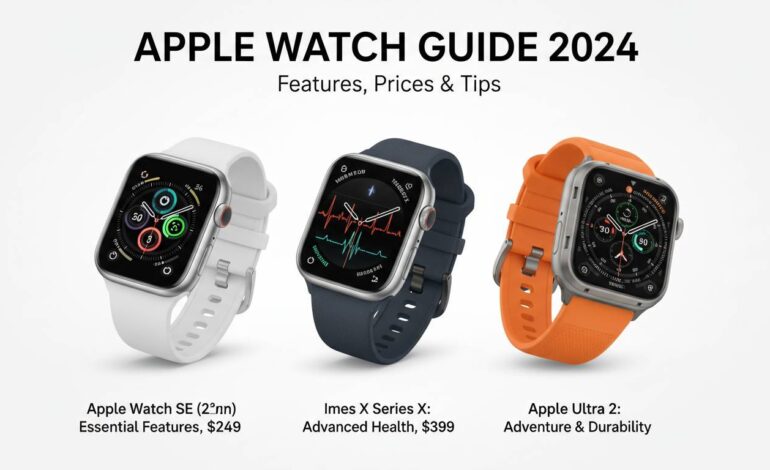
The Apple Watch dominates the smartwatch market with three models—the Series 9, SE, and Ultra 2—that serve different needs and budgets. Whether you’re a fitness enthusiast, a casual user, or someone wanting Apple’s most advanced wearable, this guide covers every feature, price point, and practical tip for making the right choice in 2024.
Current Apple Watch Lineup Overview
Apple sells three Apple Watch models, each targeting a specific user segment. Understanding where each model fits helps you make a smarter purchase decision.
The Apple Watch Series 9 is the flagship. It sits in the middle of the price range but delivers the most complete feature set. It’s the direct successor to the Series 8, with better processing power, a brighter display, and Double Tap gesture control.
The Apple Watch SE is the budget-friendly entry point. It drops some premium features while keeping what makes Apple Watch desirable—fitness tracking, notifications, and seamless iPhone integration. This model works well for first-time buyers or anyone upgrading from an older generation.
The Apple Watch Ultra 2 is for athletes, adventurers, and power users who need the ruggedest build, longest battery life, and specialized features. It looks different from other models with its larger case, extra action button, and titanium build.
All three models run watchOS 10, so you get consistent software across the lineup. But hardware differences create real distinctions in how each performs.
Apple Watch Series 9: The Complete Package
The Series 9 gives most buyers the best balance between features and price. It offers nearly everything the Ultra 2 does in a smaller, everyday design.
Display and Design
The Series 9 has a Retina OLED display that hits 2000 nits of peak brightness—double the Series 8. The screen stays readable in direct sunlight, which matters if you exercise outdoors. The always-on display looks crisp whether you’re inside or out.
You can pick 41mm or 45mm case sizes, so it works on smaller wrists and those who prefer larger watches. Aluminum cases come in Midnight, Starlight, Silver, and Pink. Stainless steel adds Gold, Silver, and Graphite. The国家队 edition has unique colorways if you want something different.
Performance and Processing
The S9 SiP powers the Series 9, making everything feel snappy and enabling on-device Siri processing. Siri requests run faster and can handle certain tasks without internet. The improved Neural Engine also makes dictation more accurate when using voice-to-text.
Health and Fitness Features
Series 9 has full health monitoring. The optical heart sensor tracks your heart rate continuously, and the electrical heart sensor lets you take ECG readings with your fingers. Blood Oxygen monitoring measures your O2 levels, useful for wellness tracking even outside pandemic concerns.
Sleep tracking records your rest patterns, and the Temperature sensor from Series 8 enables cycle tracking for women’s health. Together, these give you a complete picture of your daily wellness.
The Double Tap Gesture
Double Tap is one of Series 9’s biggest additions. Tap your thumb and index finger together twice to answer calls, stop timers, play or pause music, and move through notifications. This helps when your other hand is busy—carrying groceries, holding a coffee cup, whatever.
Battery Life
Expect around 18 hours of battery under normal use, including regular notifications, some app use, and workout tracking. This matches previous generations. You’ll need to charge overnight if you want sleep tracking.
Price
The GPS model starts at $399 for 41mm, and the 45mm costs $429. Cellular versions add $100—$499 and $529 respectively.
Apple Watch SE: Value Without Compromise
The Apple Watch SE gives you the essential Apple Watch experience at a lower price. It works well for families, first-time buyers, and anyone watching their budget.
Display and Design
The SE has the same Retina OLED display tech as Series 8—crisp visuals and good brightness. It doesn’t hit 2000 nits like Series 9, but outdoor readability is fine for most situations.
Case sizes are 40mm and 44mm, similar to Series 9. Colors include Midnight, Starlight, Silver, and Product(RED), which gives money to the Global Fund.
Performance
The SE uses the S8 SiP from Series 8. It handles all watchOS 10 features smoothly. Apps load fast, navigation feels quick, and you won’t notice a meaningful speed difference from the newer S9 chip during everyday use.
Health and Fitness Features
Here’s where differences appear. The SE lacks the blood oxygen sensor, ECG, and temperature sensing. If those health metrics matter to you, Series 9 is the way to go.
But the SE keeps the features most people actually use: continuous heart rate monitoring, activity rings, workout tracking, fall detection, crash detection, and Family Setup support. These cover what the vast majority of Apple Watch buyers need.
Family Setup
The SE really shines for families. Using Family Setup, you can pair an Apple Watch SE (or Series 4 and later) with your child’s or parent’s iPhone. They get notifications, location sharing, and safety features without needing their own iPhone. This makes the SE perfect for keeping younger family members connected.
Battery Life
Battery life matches Series 9 at around 18 hours. The same charging puck works on both models, so accessories interchange.
Price
The GPS model starts at just $249 for 40mm, with 44mm at $279. Cellular versions run $299 and $329—significantly cheaper than Series 9.
Apple Watch Ultra 2: The Adventure Companion
The Ultra 2 is Apple’s most capable and expensive Apple Watch, built for serious athletes, outdoor adventurers, and anyone who wants the absolute best.
Display and Design
The Ultra 2 has the biggest Apple Watch display ever at 49mm. The flat sapphire crystal sits in a titanium case that’s durable but light. This watch makes a statement—it looks and feels like a professional tool, not a fashion accessory.
Brightness peaks at 3000 nits, the brightest Apple display ever. Direct sunlight won’t hide your data. Night Mode turns the display red to preserve your night vision.
The Action Button
A custom-programmable Action Button sets the Ultra 2 apart from all other models. Configure it to start workouts, mark compass waypoints, control the flashlight, or trigger shortcuts. During workouts, it’s a real game-changer—pause, lap, or change运动 modes without touching the display.
Battery Life
Battery life is the Ultra 2’s killer feature. Normal use gets you up to 36 hours. Turn on Low Power Mode and you get 72 hours—three full days.
This matters for multi-day hikes, endurance events, or travel when charging isn’t convenient. Plenty of Ultra 2 owners charge every other day instead of daily.
Precision Finding
The Ultra 2 has Precision Finding for locating a lost iPhone, using the same ultra-wideband chip as iPhone 15 models. If you often misplace your phone around the house, this actually helps.
Dive and Adventure Features
Built to EN 13319 certification, the Ultra 2 is dive-rated to 40 meters—fine for recreational scuba and water sports. The Depth app launches automatically when you go underwater, showing current depth, water temperature, and dive time.
Dual speakers are louder than other Apple Watches, useful for calls in noisy places or listening to music outside. The three-microphone array captures your voice clearly even in wind.
Price
The Ultra 2 starts at $799 for GPS + Cellular—that’s the only configuration. Titanium bands cost extra: the Alpine Loop is $99, Trail Loop is $49.
Key Features Comparison
Here’s how the three models stack up:
| Feature | Series 9 | SE | Ultra 2 |
|---|---|---|---|
| Starting Price | $399 | $249 | $799 |
| Case Size | 41mm, 45mm | 40mm, 44mm | 49mm |
| Display Brightness | 2000 nits | 1000 nits | 3000 nits |
| Processor | S9 | S8 | S9 |
| Double Tap | Yes | No | Yes |
| Blood Oxygen | Yes | No | Yes |
| ECG | Yes | No | Yes |
| Temperature Sensor | Yes | No | Yes |
| Always-On Display | Yes | Yes | Yes |
| Cellular | Optional | Optional | Standard |
| Battery Life | 18 hours | 18 hours | 36-72 hours |
| Water Resistance | 50m | 50m | 100m |
| Action Button | No | No | Yes |
Series 9 and Ultra 2 both have the S9 chip, so they offer the same processing and Double Tap. The SE has the older S8, though the real-world difference is small for daily tasks.
How to Choose the Right Apple Watch
Picking the right Apple Watch means honestly assessing how you’ll use it. Consider these factors before buying.
Budget
If price matters most, the SE gives you the core Apple Watch experience at nearly half the Series 9 cost. The trade-offs—missing health sensors and the newest processor—are fine for many people. But if health tracking is important, Series 9’s extra sensors are worth paying for.
The Ultra 2 costs twice as much as Series 9. Whether it’s worth it depends entirely on how you’ll use those extra features. For casual users, it’s hard to justify. For athletes and adventurers, it might be worth every penny.
Wrist Size and Style
The Ultra 2’s 49mm case really needs larger wrists. On smaller wrists, it looks oversized and feels heavy. Series 9’s 41mm and 45mm sizes fit most wrists. The SE’s 40mm and 44mm options are similar.
Try them in person if you can. How a watch looks on your wrist matters more than specs on paper.
Fitness Goals
Casual fitness fans get everything they need from Series 9 or SE. Both track workouts, monitor heart rate, and motivate through activity rings well.
Serious athletes should look closely at Ultra 2. The Action Button changes workout tracking, the battery handles long events, and the dive rating opens underwater activities. The brighter display helps outdoors where readability counts.
Battery Anxiety
If charging every night feels like a hassle, Ultra 2’s multi-day battery is a real advantage. Plenty of Ultra 2 owners charge every two or three days instead of daily. That’s a genuine lifestyle difference.
Future-Proofing
Series 9’s newer processor and sensors probably mean it gets software updates longer than the SE. If keeping the watch for five-plus years matters, that favors Series 9.
Tips for Getting the Most Out of Your Apple Watch
An Apple Watch needs some setup and ongoing attention to get full value. These tips help you start right and keep things working well.
Start with Proper Setup
During setup, enable notifications carefully. Letting everything buzz on your wrist ruins the experience fast. Pick three or four apps that really deserve haptic alerts and leave the rest on your phone.
Set your activity goals realistically. The default move goal might be too aggressive or too easy. Adjust it based on your actual activity, then think of it as a gentle nudge rather than something impossible.
Master the Complications
Complications—the small data points on watch faces—determine whether you need to raise your wrist or open apps. Spend time customizing faces with complications you actually check: weather, calendar events, activity progress, or apps you use often.
The Modular face gives you the most information. Simpler faces like Simple look cleaner. Make different faces for different contexts—one for work, one for workouts.
Optimize Battery Health
Extreme temperatures degrade battery capacity over time. Take the watch off while charging if it feels unusually warm. For long-term storage, charge to about 50% before putting it away.
Explore Workout Features
The Workout app does more than basic tracking. Try custom workouts with intervals, heart rate zones tailored to your fitness level, and outdoor routes that map your path. These features turn the watch from a passive tracker into an active training tool.
Use Apple Fitness+
If you subscribe to Apple Fitness+, the watch becomes more useful. Trainers guide workouts while the watch tracks your heart rate and calories, displaying their guidance on your TV while the watch records everything. The integration feels seamless once you try it.
Conclusion
Choosing the right Apple Watch in 2024 comes down to knowing your priorities and budget. The Apple Watch Series 9 stays the best overall pick for most people, delivering nearly all features at a reasonable price. The Apple Watch SE gives exceptional value for those wanting core functionality without premium health sensors. The Apple Watch Ultra 2 earns its premium for athletes, adventurers, and anyone who values multi-day battery life and professional-grade durability.
Whatever model you pick, the Apple Watch experience shares common elements: seamless iPhone integration, solid fitness tracking, and a platform that improves through regular updates. Your decision should reflect how you actually plan to use the watch, not chase specifications you’ll never touch.
FAQs
Which Apple Watch should I buy in 2024?
For most people, Apple Watch Series 9 offers the best balance of features and price at $399. It has all essential health sensors, the latest processor, and the convenient Double Tap gesture.
Is the Apple Watch SE worth it over Series 9?
If budget matters, the SE at $249 is a great value. But if you want blood oxygen monitoring, ECG, or the temperature sensor for cycle tracking, Series 9 is worth the extra $150.
How long does Apple Watch battery last?
Series 9 and SE give about 18 hours, so you charge daily. Ultra 2 runs 36 hours normally and up to 72 hours in Low Power Mode—multiple days on one charge.
Can I swim with my Apple Watch?
All current Apple Watches are water-resistant to 50 meters (Series 9 and SE) or 100 meters (Ultra 2). You can swim safely with any model. Ultra 2 is specifically designed for diving.
Does Apple Watch work without an iPhone?
An Apple Watch needs an iPhone for setup and ongoing use. Once paired, some features like music storage and notifications work independently with Cellular models, but the phone stays necessary for many functions.
Should I get GPS or Cellular?
GPS models work fine if your phone is usually nearby. Cellular adds $100 and lets you take calls, messages, and data without your iPhone—useful for workouts when carrying a phone feels like a hassle or for staying connected during activities where phones aren’t practical.