Cloud Security Tips: Ultimate Guide to Protect Your Data

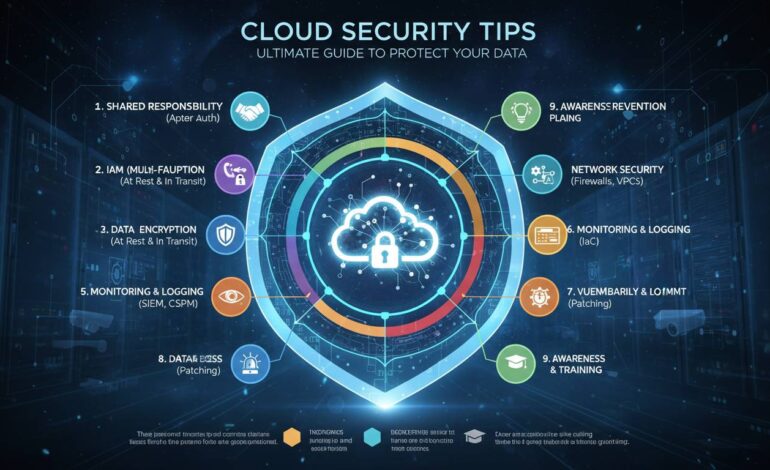
Cloud security isn’t optional anymore. Whether you’re running a small business or managing enterprise infrastructure, protecting your data in the cloud takes real effort—not just configuration tweaks, but ongoing attention as threats evolve. This guide walks through practical steps you can take right now to lock down your data, keep unauthorized users out, and respond quickly if something goes wrong.
More than 90% of enterprises use cloud services now. That massive shift has changed how organizations store and process data—and it’s created a huge attack surface that cybercriminals are actively exploiting.
Cloud environments present unique challenges that don’t exist in traditional on-premises setups. Your data sits somewhere accessible from anywhere, often shared across multiple customers on the same infrastructure, frequently spread across data centers in different countries. Understanding these dynamics matters because it shapes the security decisions you need to make.
Here’s the thing most people miss: cloud security operates on a shared responsibility model. Your provider secures the underlying hardware and network infrastructure. You? You’re responsible for protecting your data, your applications, and who can access what. Breaches rarely happen because AWS or Azure failed to secure their side. They happen because someone left an S3 bucket open, used “password123,” or gave a contractor more access than they needed.
“The biggest security risk in cloud environments isn’t the technology itself—it’s the human element. Misconfigured access controls and stolen credentials account for the majority of cloud data breaches.” — A principal analyst at a leading cybersecurity research firm
Let’s get into what actually works.
Lock Down Identity and Access
Identity and access management—IAM, if you’re keeping score—is where everything starts. Every user, every application, every service that connects to your cloud resources needs proper authentication and authorization. Skip this, and you’re essentially leaving your front door unlocked.
Multi-factor authentication (MFA) is non-negotiable. Passwords get leaked constantly through data breaches, and people reuse the same passwords across services. MFA adds a second verification step—whether that’s a code on your phone, a hardware token, or a fingerprint—that makes stolen credentials much less useful to attackers.
Apply least privilege everywhere. Give users exactly the permissions they need to do their specific job, nothing more. Then actually review access rights regularly and cut anything unnecessary. In practice, most organizations accumulate what security folks call “permission creep”—employees pick up access over time as they change roles, and nobody ever takes anything away.
Use role-based access control (RBAC) to organize permissions logically. Cloud providers let you define roles that match job functions, then assign people to those roles. Much easier than managing permissions for each individual.
Consider identity federation with your existing directory service. Single sign-on across applications while maintaining centralized control. When someone leaves, deactivating their account kills access everywhere at once—no hunting through dozens of services to revoke permissions.
Encrypt Everything
Encryption is your safety net. If attackers somehow get past everything else, properly encrypted data remains unreadable without the keys. It’s not optional—it’s the last line of defense.
Enable encryption at rest for all storage services, databases, and backups. Cloud providers offer built-in encryption using AES-256, which satisfies most compliance requirements. If you’re dealing with especially sensitive workloads, bringing your own encryption keys (BYOK) gives you more control.
Use TLS for data in transit. This protects information as it moves between users, applications, and cloud services. Kill off outdated protocols like SSL 3.0 and TLS 1.0—they have known vulnerabilities that attackers still actively use.
Handle your keys carefully. Store them separately from encrypted data, rotate them on a schedule, and restrict access to just the systems that actually need them. Cloud providers offer key management services that handle a lot of this complexity while maintaining security certifications.
Stop Getting Hacked Through Misconfiguration
Misconfiguration is the number one cause of cloud data breaches. Default settings prioritize ease of use over security, which means you have to actively harden your environment.
Audit your storage bucket permissions. Publicly accessible S3 buckets and similar services have exposed enormous amounts of data. Review all storage resources regularly. Use bucket policies and access control lists to enforce strict permissions.
Lock down your network security groups. Default to deny-all policies, then explicitly permit only the traffic you need. So many breaches happen because organizations left management ports like RDP and SSH exposed to the entire internet.
Turn on logging everywhere. AWS CloudTrail, Azure Monitor, Google Cloud Logging—use them. Store logs in a dedicated, tamper-proof location separate from your production environment so attackers can’t cover their tracks.
Review cross-account access permissions. Organizations often grant too much access to third-party services or partner accounts. Audit these relationships regularly and cut access that’s no longer needed.
Keep Patching
Outdated software has known vulnerabilities that attackers actively scan for and exploit. Cloud environments move fast, which makes patch management harder—but it’s critical.
Automate patching wherever possible. Cloud providers offer services that can automatically apply security updates. Enable automatic updates for operating systems, but test them in staging first to avoid breaking things.
Don’t forget application-layer updates. Custom applications, containers, serverless functions—they all need regular updates. Build security patches into your deployment pipelines and set timelines for addressing high-severity vulnerabilities.
Find your forgotten resources. Test environments, development instances, old projects people stopped working on—these often run outdated software and represent significant attack vectors. Regular audits surface the systems that need attention.
Manage dependencies carefully. Modern applications pull in lots of third-party libraries. Use tools that scan for vulnerable components in your code repositories and container images. Address known vulnerabilities promptly.
Backups That Actually Work
Backups are your insurance policy. But having backups doesn’t mean anything if you can’t actually restore from them.
Follow the 3-2-1 rule: three copies of data, on two different types of storage, with one copy stored offsite. Cloud-native backup services automate a lot of this.
Encrypt your backups with keys separate from production systems. This protects against external attackers and insider threats. Hardware security modules (HSMs) give you the highest level of protection for your keys.
Test your recovery procedures quarterly. Verify backups actually work, estimate how long recovery takes, and document problems you encounter. You’d be surprised how many organizations discover backup failures only when they actually need to restore.
Set retention policies that meet both business needs and regulatory requirements. Some compliance frameworks mandate specific retention periods.
Watch for Threats Continuously
Continuous monitoring lets you catch problems before they become disasters. Cloud environments generate enormous amounts of telemetry—using that data effectively requires the right tools.
Deploy cloud-native security platforms that understand cloud-specific attack patterns. AWS GuardDuty, Azure Defender, Google Cloud Security Command Center use machine learning to spot suspicious activities that rule-based systems miss.
Set up alerts for critical events: failed login attempts, privilege escalations, unusual data exfiltration, changes to security configurations. Tune your thresholds to balance false positives against missing real threats.
Consider a SIEM solution if your environment is complex. These platforms aggregate logs from multiple sources, correlate events across systems, and give you centralized visibility.
Intrusion detection systems and network traffic analysis can identify command-and-control communications, lateral movement attempts, and other signs of compromise that might otherwise go undetected.
Have a Plan for When Things Go Wrong
Security incidents will happen. Even the best defenses sometimes fail. A solid incident response plan means you can contain damage, recover operations, and learn from what happened.
Document clear response procedures. Assign specific roles—someone for containing threats, someone for preserving evidence, someone for communicating with stakeholders, someone for restoring operations. Different incident types may need different approaches.
Run tabletop exercises regularly. Simulate ransomware attacks, data breaches, account compromises. These reveal gaps in your procedures and help your team develop muscle memory for actual incidents.
Build relationships with external resources before you need them. Legal counsel with technology experience, forensic investigators, PR support, cloud provider incident response teams. Gathering contact information during a crisis wastes time you don’t have.
Do post-incident analysis. Document what happened, what worked well, what didn’t, and specific improvements to implement. Share lessons learned across your organization.
Train Your People
Human error factors into most security incidents. Regular training helps employees recognize threats and follow best practices.
Security awareness training for everyone, not just IT. Cover phishing, password hygiene, social engineering, proper data handling. Make it engaging with real examples.
Run phishing simulations periodically. Track results and provide extra training for people who repeatedly fall for tests. This builds resilience without real consequences.
Clear security policies that people actually understand. Acceptable use, data classification, remote work security, how to report suspicious activity. Make policies accessible.
Leadership needs to model the behavior. Executives who ignore security protocols undermine the entire culture. When the boss follows the rules, everyone else is more likely to too.
Segment Your Network
Network segmentation limits damage by dividing your infrastructure into isolated zones. If attackers compromise one area, they can’t automatically reach everything.
Separate development, staging, and production strictly. Code and data shouldn’t flow directly between environments without going through proper pipelines with security checks.
Segment based on data sensitivity. Workloads handling customer information, financial records, or intellectual property should be isolated from general business systems. Add extra controls—stronger encryption, stricter access controls—to these sensitive zones.
Use VPCs and private subnets to control traffic between services. Flat networks where any system can reach any other system are a bad idea. Implement network ACLs and security groups at every boundary.
Zero-trust architecture assumes no implicit trust based on network location. Every access request gets authenticated and authorized, whether it comes from inside or outside your network.
Wrapping Up
Cloud security requires ongoing attention, not a one-time setup. The threat landscape changes constantly as attackers develop new techniques. The fundamentals haven’t changed much: strong identity management, proper encryption, vigilant monitoring, solid incident response. Do these things consistently and you dramatically reduce your risk.
Start with the basics—enable MFA, encrypt everything, lock down access controls. Then layer in more advanced measures. Remember, security is a journey.
Your organization bears primary responsibility for protecting data in the cloud. Providers secure their infrastructure; you secure what runs on it. Investing in security now saves enormous cost and reputational damage later.
Review your security posture quarterly. Update policies as threats evolve. Make sure everyone in your organization understands their role. With consistent attention to these fundamentals, you can use cloud computing confidently while keeping your data protected.
Common Questions
What’s the most important cloud security step for beginners?
Enable MFA, encrypt data at rest and in transit, and implement least-privilege access controls. These three measures address the most common causes of cloud breaches and provide substantial protection without much complexity.
How often should I review cloud security settings?
Comprehensive reviews quarterly, continuous monitoring for immediate threats. Audit access permissions at least monthly, and review configuration settings after any significant infrastructure changes or security incidents.
Do I need special tools for cloud security monitoring?
Cloud providers offer native tools—GuardDuty, Azure Defender, Security Command Center—that provide excellent baseline monitoring. For complex environments, third-party SIEM or cloud security posture management (CSPM) tools offer cross-cloud visibility and compliance automation.
What’s the biggest cloud security mistake organizations make?
Assuming the cloud provider handles everything. Providers secure infrastructure, but you’re responsible for access controls, data protection, and application-level security. That misunderstanding leads to preventable breaches.
How do I know my cloud backups are actually secure?
Encrypt backups with separate keys from production data, store them in isolated accounts, test restoration quarterly. Verify backup access requires the same strong authentication as production systems, and maintain immutable backup copies where possible.