*67 Does What: How *67 Hides Your Caller ID When Making Calls

67 Hides Your Caller ID When Making Calls
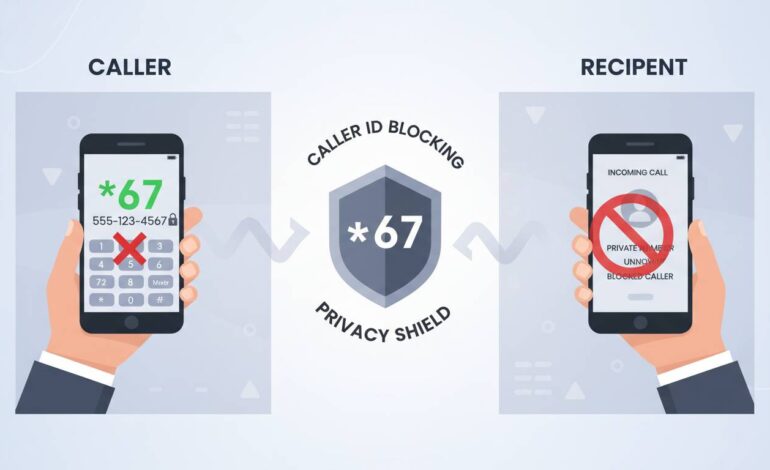
When you dial 67 before calling, you instantly tell your phone company to hide your number. In a nutshell: 67 blocks your caller ID, making your number appear as “Private” or “Blocked” to the person you’re calling. It’s basically an easy, quick way to make your call anonymous without permanent settings. Now let’s unpack why and how it works, its perks, limitations, and when it won’t do what you expect.
Why *67 Matters for Your Privacy
Ever needed to stay under the radar for a call? Maybe you’re confirming a surprise party or avoiding spam callbacks. *67 is useful for that—it gives you momentary privacy. But remember, it’s not a blanket shield. It’s more like a one-off cloak just for that one call.
Many skip this step, thinking it’s too techy. Actually, it’s just dialing *67, then the number. Done. And no need to dive into settings menus.
How *67 Actually Hides Caller ID
Here’s the simple mechanics of *67:
- You dial *67.
- Your carrier gets a signal: “Don’t send caller ID for the next call.”
- You dial the number.
- The recipient sees “Private,” “Blocked,” or “Unknown.”
It’s not magic—it’s a standard telecom feature. Beyond that, the number isn’t saved in their recent calls list as yours. But again, that recipient—and also businesses—may still trace it if they want to.
A Few Realisms
- *67 works on regular voice calls, but not on most VoIP apps (like WhatsApp or FaceTime).
- Some companies override it; emergency services (911 in US) will still see your number, for safety.
- International dialing? It might not hide your ID unless supported in that country.
Situations Where *67 Might Fail You
You might expect *67 to work every time—but sometimes, it doesn’t. Here’s when it might fall short:
- Auto-redial features: Some systems reveal your number when they reconnect.
- Business lines: Certain call centers and customer support phones ignore *67 and still display the caller’s number.
- Whitelist systems: Hospitals or banks often can see who’s calling even if you block caller ID.
- No-show on cell networks: A few carriers don’t honor *67. That’s rare, but it happens.
So, if you’re hoping for 100% anonymity—just know, it’s not waterproof.
Using *67 Across Devices and Carriers
- On most US mobile phones, dial *67 + number and go.
- On landlines, same thing—pretty universal.
- On international networks, results vary. Some countries don’t allow caller ID blocking.
- With Google Voice or similar apps, *67 might get ignored or misinterpreted. Always test first if privacy matters.
- If you want to automatically block your number for every call, some smartphones let you toggle “Hide Caller ID” in settings. That’s different from *67, because it’s permanent.
Benefit Rundown: Pros and Cons
Let’s keep it short:
Pros
– Quick and easy privacy.
– No app or settings needed.
– Good for one-time anonymity.
Cons
– Not always granted (e.g. business lines, emergency).
– Doesn’t hide number from recipient’s telco records.
– Doesn’t apply to app-based voice calls.
When *67 Isn’t Enough
Want more stealth? Here are a few alternatives that up your game:
- Use a burner phone: Prepaid numbers ensure your main identity isn’t tied.
- Temporary number apps: Services like Burner or Hushed let you mask your real number with a short-lived one.
- Add-on privacy services: Some carriers offer paid plans shielding your number.
Those aren’t perfect either, but they give you more flexibility than *67.
Behind the Scenes: How It Works Technically
Here’s the geekier view of what happens:
- Starting the call, your carrier intercepts the *67 code.
- For the next call only, your carrier tags the outgoing call so it doesn’t carry your ID.
- The call goes through as normal, minus the ID.
- After that, your ID returns to normal.
There’s no trace on your end. It’s a temporary flag sent live.
But the call still goes through your carrier’s logs—so if anyone cares to dig, the trace back to your number is there. *67 just hides it from sight on the recipient’s display.
Use Cases: Where *67 Shines… or Doesn’t
Short real examples bring it to life:
- Scheduling surprise dinners. You call, face stays private.
- Calling to check service hours. Avoid getting your number in their marketing lists.
- One-off inquiries to strangers.
On the flip side, using it for urgent matters with police or healthcare? Skip *67. They need to know who’s calling. Often, the call won’t even go through anonymously.
Human Take: Quirkiness and Privacy
Imagine calling your grandma, planning a surprise party. She picks up, sees “Private,” and playfully tells you not to prank her. That’s often the reaction—light, human, unexpected.
There’s a tiny thrill of harmless mystery in the feature. Not tech-y, just a small trick you can use.
“Blocking your number with *67 is like knocking on a door wearing a costume. You’re still you, just kind of… incognito.”
Fun, right?
Quick Reference Table
| Want to… | Use 67? | Notes |
|——————————–|———-|——————————————————|
| Hide number for one call | Yes | Works instant; dial 67 + number |
| Auto-hide every call | Maybe | Some phones have permanent “Hide Caller ID” option |
| Hide from businesses/agencies | Not foolproof | They may still log your number |
| Use in apps like WhatsApp | No | Apps don’t respond to *67 |
| Make anonymous international calls | Varies | Depends on country/carrier support |
When *67 Is Just Enough
For quick one-time privacy, *67 does the job. It’s easy, familiar, and free. Like slipping a note into an envelope rather than mailing a package. Ideal for those brief, small moments when you want privacy.
It’s not a shield. It’s a small veil for one call. And that’s okay—it fits those little day-to-day needs.
Final Thoughts
*67 isn’t a superpower, but it’s handy. It’s a private mode for your voice, simple and immediate. You dial it when you need a quick privacy shield. It’s not perfect, but it’s easy. If you want more, look into temporary numbers or burner phones. But for many of us—in those small, fleeting calls—this little code does just fine.
FAQs
Does *67 hide your number from everyone?
Not everyone. It blocks caller ID on most personal calls, but businesses, emergency services, and phone systems may still record your number.
Can the recipient trace my number even if I use *67?
They can’t see it on their screen, but their carrier still logs it. With enough effort, it’s traceable behind the scenes.
Will *67 work on WhatsApp or FaceTime?
Nope. *67 works only on regular carrier-based phone calls, not apps.
How do I hide my number permanently, not just once?
On many phones, you can enable “Hide Caller ID” in settings. Or use third-party services or apps for lasting anonymity.
Is there any risk using *67?
Mostly it’s safe. But if you’re calling emergency services, they may reject or override the block. Also, some business systems might ignore it.
Does *67 work internationally?
It depends. In many countries, yes—but some don’t honor caller ID blocking. Better to test it or check with your provider if you rely on it when abroad.